








What Are Laptop Loaner Delays?
Laptop loaner delays occur when:
- Employees cannot access a replacement device quickly
- IT teams cannot fulfil requests efficiently
- Loaner processes are slow, manual, or inconsistent
This affects:
- Corporate offices
- Hybrid workplaces
- Healthcare environments
- Universities and education
- Field and operational teams
Why Laptop Loaner Delays Increase at Scale
1. Manual Distribution Causes Laptop Loaner Delays
In most organisations, loaner laptops are managed by IT:
- Requests are submitted
- IT staff locate a device
- Devices are configured and handed over
At scale, this creates:
- Queues of requests
- Dependency on IT availability
- Delays in response time
Manual distribution does not scale with demand.
2. Limited Device Visibility Creates Laptop Loaner Delays
IT teams often cannot instantly see:
- Which laptops are available
- Which are in use
- Where devices are located
This leads to:
- Time spent searching
- Delays in allocation
- Devices appearing “missing”
Why Asset Tracking Problems Break at Scale (And Why Visibility Disappears)
3. Poor Device Storage Increases Laptop Loaner Delays
Loaner laptops are commonly kept in:
- IT rooms
- Storage cupboards
- Drawers or shelves
At scale:
- Devices are misplaced
- Access becomes inconsistent
- Retrieval takes longer
IT asset lockers for laptop collection
provide a secure, self-service way to store and distribute loaner or replacement laptops while improving device visibility and access.
4. Peak Demand Causes Laptop Loaner Delays
Demand spikes occur during:
- Start of the workday
- IT outages
- Device refresh cycles
- New employee onboarding
At these moments:
- Multiple users need devices simultaneously
- IT teams cannot respond fast enough
- Delays multiply
Guide: Why Asset Audit Trails Break at Scale and How to Fix It
5. Device Readiness Issues Create Laptop Loaner Delays
Even when devices are available:
- They may not be configured
- Batteries may be flat
- Software may not be ready
This adds:
- Additional wait time
- More pressure on IT teams
Availability is not enough — readiness matters.
IT asset lockers for laptop collection
can provide a secure self-service handover point for prepared devices, helping employees collect replacement or loaner laptops without waiting for an IT desk.
6. No Accountability for Device Usage
Without proper tracking:
- Devices are not returned on time
- Ownership is unclear
- Loaner pools shrink
This creates:
- Artificial shortages
- Reduced availability over time
Why Asset Retrieval Delays Break at Scale
7. Manual Tracking Contributes to Laptop Loaner Delays
Tracking via:
- Spreadsheets
- Ticketing systems
- Manual logs
Fails because:
- Updates are delayed
- Data becomes inaccurate
- Device status is unclear

The Hidden Impact of Laptop Loaner Delays
Lost Productivity
Increased IT Workload
Employee Frustration
Reduced Asset Utilisation
Laptop Loaner Delays: The Key Issues
The Core Problem: Device Access Depends on IT Availability
Laptop loaner delays rarely occur because there are too few devices.
They happen when manual distribution processes, limited device visibility, and IT-dependent access reduce the availability of loaner laptops across the organisation.
1. Manual Distribution Slows Device Access
Many organisations rely on IT teams to locate, prepare, and hand over loaner laptops.
Impact: Employees wait longer for replacement devices and productivity is disrupted.
Compare smart lockers vs mobile storage
2. Limited Visibility Causes Laptop Loaner Delays
Without real-time tracking, IT teams often cannot see which devices are available, in use, or overdue for return.
Impact: Delays locating devices and reduced utilisation of loaner pools.
Why Asset Retrieval Delays Break at Scale
3. Device Readiness Creates Bottlenecks
Loaner laptops may require charging, configuration, or software updates before use.
Impact: Additional wait times and increased pressure on IT support teams.
Why Traditional Processes Cause Laptop Loaner Delays
Manual Distribution Creates Delays
Many organisations rely on IT teams to manage loaner laptops. As demand increases, manual handovers become slower and more difficult to scale.
Common issues include:
- Delayed device access
- IT dependency
- Request backlogs
- Reduced productivity
Limited Visibility Reduces Availability
Without real-time tracking, IT teams often struggle to see which devices are available, in use, or overdue for return.
Challenges include:
- Unknown device availability
- Missing or misplaced laptops
- Inefficient asset allocation
- Increased IT workload
Device Readiness Creates Bottlenecks
Even when devices are available, they may require charging, configuration, or updates before use.
This results in:
- Longer wait times
- Delayed onboarding
- Slower incident recovery
- Increased support pressure
How Smart Lockers Eliminate Laptop Loaner Delays
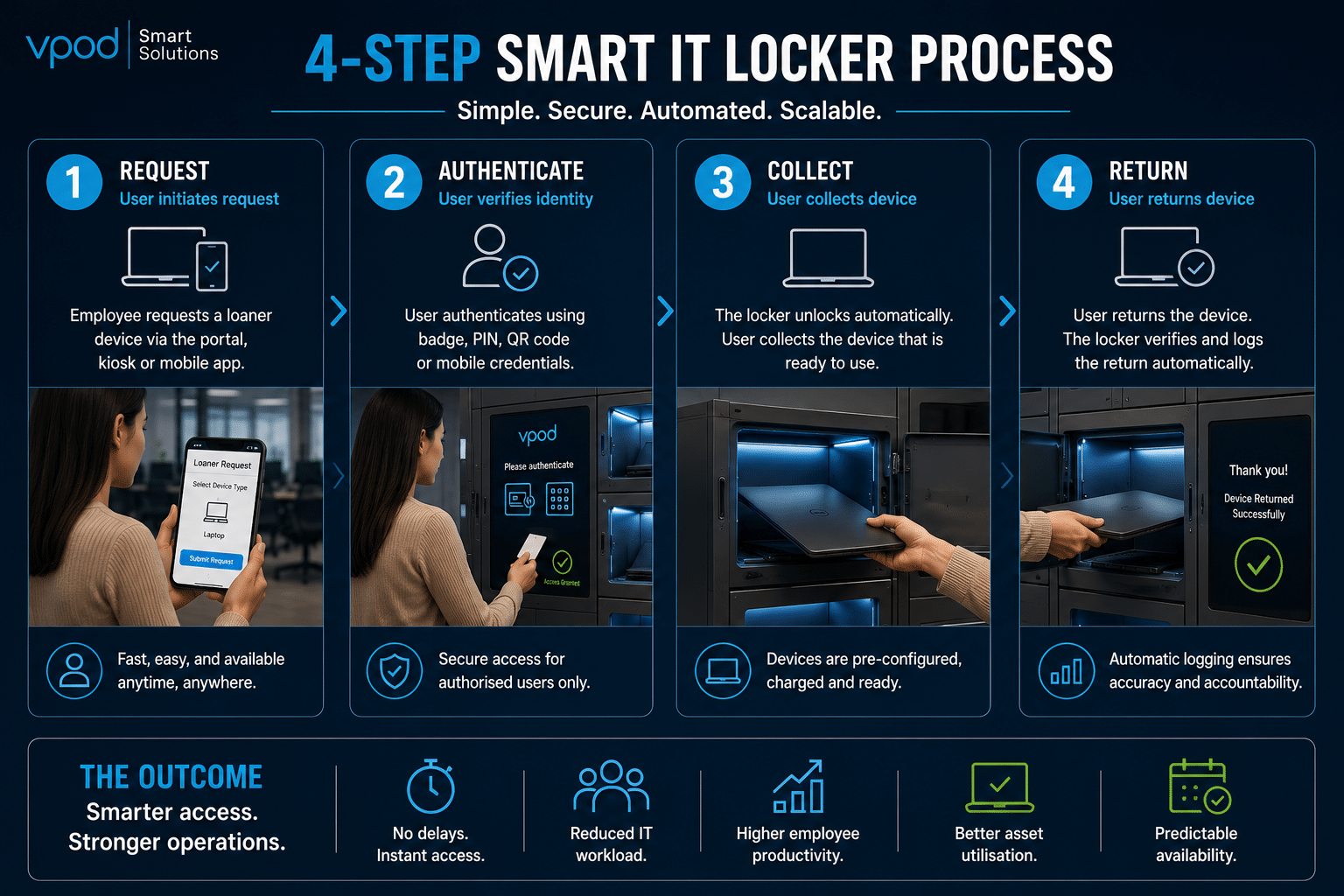
Smart IT lockers provide secure, automated access to loaner devices without requiring IT intervention.
Benefits include:
- Self-service laptop collection
- Real-time device visibility
- Automated tracking and audit trails
- Secure user authentication
- Fully charged, ready-to-use devices
- Reduced IT workload
By replacing manual distribution and tracking processes with smart lockers, organisations can reduce laptop loaner delays, improve productivity, and create a scalable device management operation.
Eliminating Laptop Loaner Delays with Smart IT Lockers
Traditional Laptop Loaner Systems vs Smart IT Locker Systems





Case Study: Mars & VPOD
How Mars Improved Device Access and Reduced Manual IT Processes
Managing workplace assets across multiple locations can create delays, inefficiencies, and increased pressure on support teams.
By implementing VPOD smart lockers, Mars introduced secure, automated access to workplace equipment and reduced reliance on manual processes across four UK sites.
Results Include:
- Faster access to workplace devices
- Reduced manual administration
- Improved asset visibility
- Better operational efficiency
- Scalable multi-site deployment
- Enhanced employee experience
Who Is Affected by Laptop Loaner Delays?
IT & Workplace Technology Teams / Employees & End Users
IT & Workplace Technology Teams
Key Challenges
- Managing loaner device availability
- Supporting employees quickly
- Tracking shared devices
- Maintaining device readiness
- Reducing IT support bottlenecks
Operational Pain Points
- High volume of loaner requests
- Time spent locating devices
- Manual distribution processes
- Limited visibility of device status
- Increased support workload