Global leaders in Smart Lockers & Smart Experiences
We design and deliver integrated systems for streamlined check-ins, secure storage, and enhanced visitor management. Our trusted partner network and focus on sustainability, data security, and customer success drives us to provide the most effective and user-friendly solutions.
Vflex Smart Lockers, Powered by Keynius, are a state-of-the-art product with quality in-house manufacturing, intelligent design, and a cloud-based platform that can support multiple locker workflows in one smart locker wall.
Vflex Smart Lockers, Powered by Keynius, are a state-of-the-art product with quality in-house manufacturing, intelligent design, and a cloud-based platform that can support multiple locker workflows in one smart locker wall.
Vflex Smart Lockers, Powered by Keynius, are a state-of-the-art product with quality in-house manufacturing, intelligent design, and a cloud-based platform that can support multiple locker workflows in one smart locker wall.
Vflex Smart Lockers, Powered by Keynius, are a state-of-the-art product with quality in-house manufacturing, intelligent design, and a cloud-based platform that can support multiple locker workflows in one smart locker wall.
Global leaders in Smart Lockers & Smart Experiences
We design and deliver integrated systems for streamlined check-ins, secure storage, and enhanced visitor management. Our trusted partner network and focus on sustainability, data security, and customer success drives us to provide the most effective and user-friendly solutions.
Global leaders in Smart Lockers & Smart Experiences
We design and deliver integrated systems for streamlined check-ins, secure storage, and enhanced visitor management. Our trusted partner network and focus on sustainability, data security, and customer success drives us to provide the most effective and user-friendly solutions.
Move service tickets into secure self-service fulfilment.
Connect an approved TOPdesk request to secure equipment issue or return through a Vpod locker, keep the employee informed and route exceptions back to an accountable service owner.
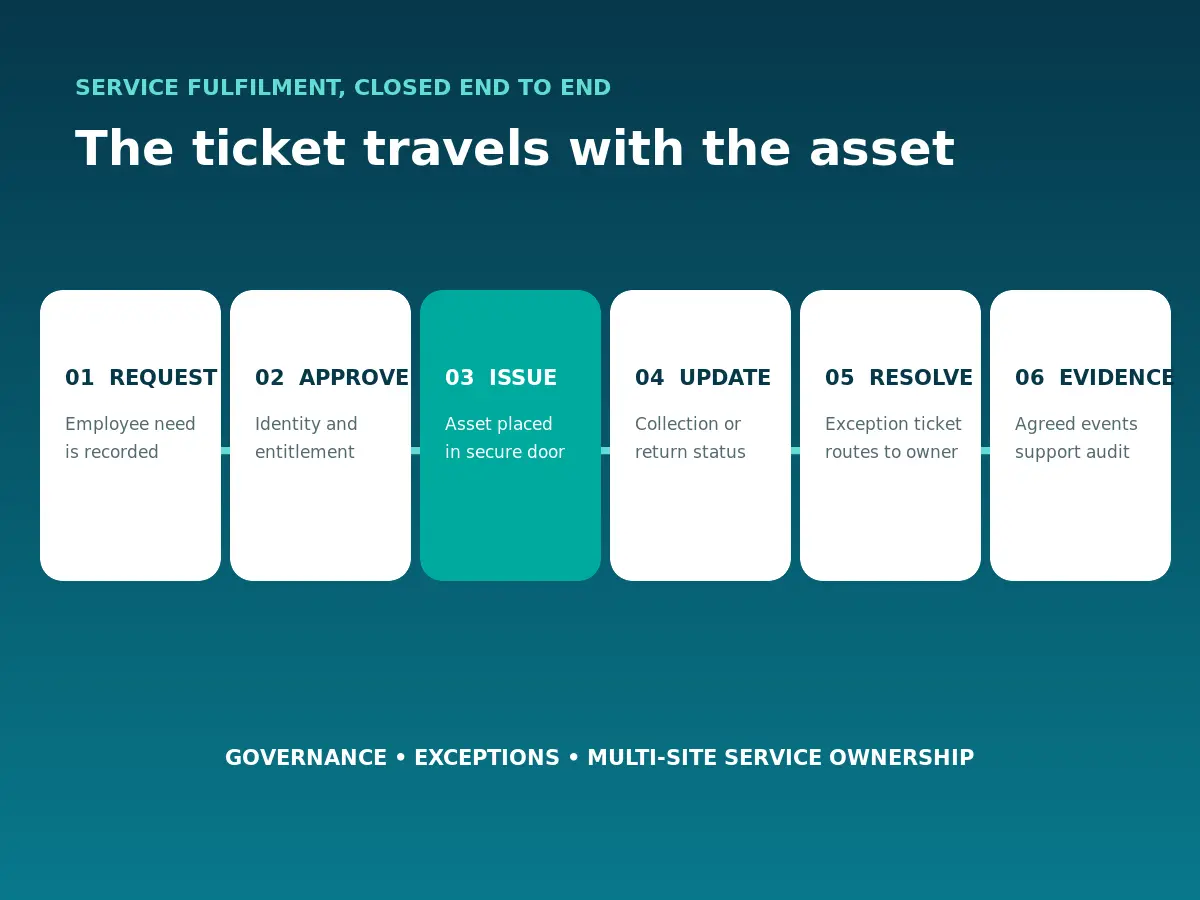
An employee request, incident, onboarding task, repair need or return starts the process.
02 · IDENTITY
Approve
The owning policy confirms identity, entitlement, asset type and site to help prevent unauthorised equipment access.
03 · ALLOCATION
Issue or return
The workflow associates the user and asset with a suitable available locker door, supporting accountability when addressing equipment loss.
04 · EXPERIENCE
Notify and access
The employee receives clear instructions and uses the agreed credential, PIN or mobile route. Explore how self-service collection can address device availability issues.
05 · EVENTS
Update status
Agreed deposit, collection, opening or timeout events can update the service record.
06 · EXCEPTIONS
Raise and route
Failed access, wrong items, no-shows and overdue returns create an accountable response.
07 · GOVERNANCE
Control the model
Define data, roles, audit needs, retention, service ownership and change control.
08 · MULTI-SITE
Standardise safely
Apply common naming and reporting while documenting local policies and escalation paths.
Follow the item and the service event across the estate.
The Vpod Smart Estate Logistics Platform video illustrates the wider operating principle: connect physical movement, secure storage and service visibility. Explore more examples in the smart locker video library.
Confirm the service process and interface together.
Trigger
Confirm the TOPdesk request, incident or state change that begins each journey. Review the official TOPdesk API documentation when scoping the interface.
Identity
Define the authoritative user source, entitlement and credential route. Where relevant, assess the Microsoft Entra ID locker identity pathway separately for compatibility with this workflow.
Action and events
Agree allocation rules and which locker events return to which record.
Exceptions
Assign ownership for failed access, no-shows, wrong assets and overdue returns.
Governance
Confirm minimum data, access, retention, audit and change-control requirements.
Multi-site delivery
Standardise configuration and reporting while documenting local variation. Explore the Vpod partner network for wider delivery expertise.
Integration availability, supported triggers, data direction and delivery scope must be confirmed during solution design. This page does not assert a certified native integration, customer deployment or commercial partnership. Product names and trademarks belong to their respective owners.
Map the fulfilment workflow
Connect the service request to secure issue and return.
Bring the current request types, approval rules, asset records, identity model, exception paths and site requirements. Explore the wider smart locker integration pathways when mapping your technology requirements.